Contenido privado. Almacenado localmente.

Tus cosas privadas.
De verdad privadas.

Deja de tener vídeos sensibles dispersos entre Descargas, Vídeos, el Escritorio y carpetas por todas partes. Guarda todo en una única bóveda discreta y cifrada.

Almacenamiento local · Sin subir archivos a la nube · Sin necesidad de una cuenta

Tap the fullscreen button on the player for the best view

How it works

Four steps.
Less clutter.

De Vault helps you find, review, organize and protect sensitive content without sending it anywhere.

01

Scan

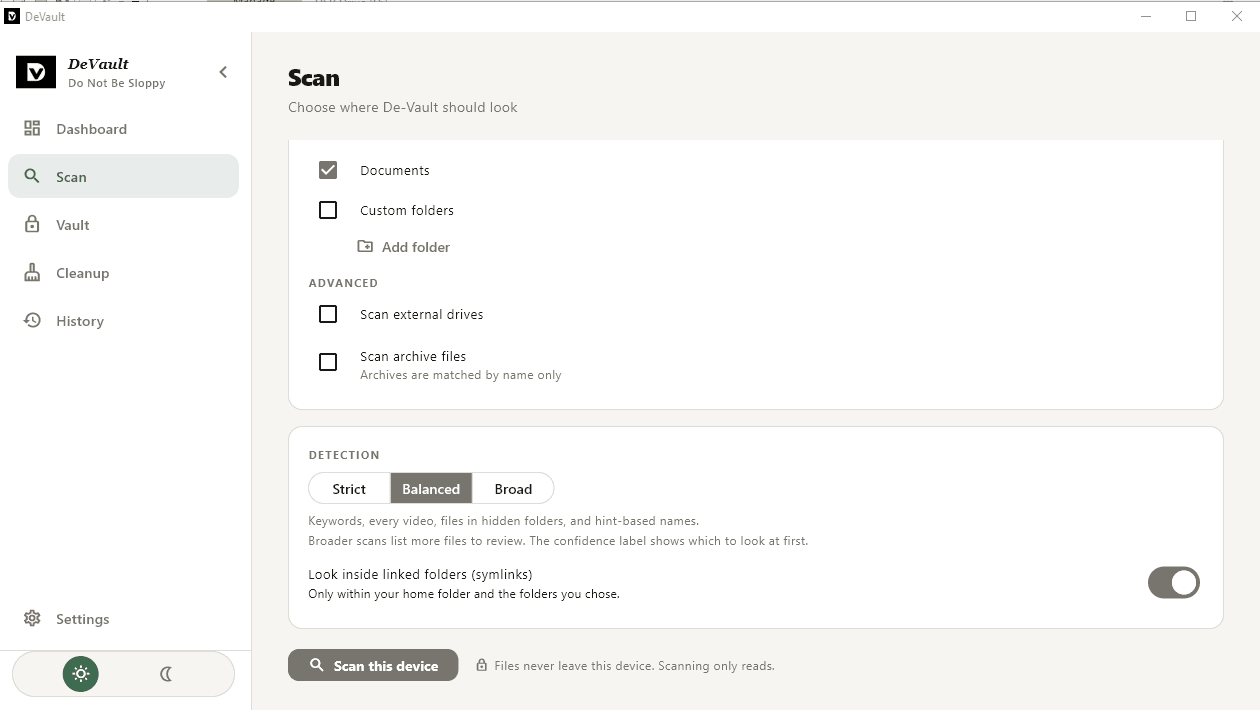
Find potentially sensitive videos and files across your device.

02

Review

You stay in control. Review what De Vault found before taking action.

03

Vault

Move what you want to keep into one encrypted private vault.

04

Lock

Lock your vault and keep private material away from ordinary browsing.

Already protecting private files on computers around the world.

45% of adults admit to looking through a partner's,a friend's and even stranger's phone and device without permission (Incogni survey).

200+

downloads

and growing every week

20

countries

from India to Russia

0

cloud uploads

Your files never leave your computer

0

accounts to create

Install it, set a password, done

Screenshots

A look inside De Vault

Scan screen in dark mode
Swipe sideways to see the whole screen

Scan screen in dark mode

Designed around one simple principle

🔒 Local-first◉ No cloud uploads✓ Review before action⚡ Simple by design
The problem

Don't be sloppy.

Your computer remembers more than you think. Private content can end up scattered across places you forgot about.

Scattered files

Downloads, Videos, Pictures, Desktop, random folders and duplicate copies.

Accidental exposure

Shared computers and casual browsing can turn private content into an awkward surprise.

Digital leftovers

Old downloads, recent files and other traces can stick around long after you thought you cleaned up.

📁 Downloads
📁 Videos
📁 Pictures
🔒 De VaultLocked
Real life happens

Shared laptop?
Family computer?
Don't rely on luck.

Maybe someone needs to borrow your laptop. Maybe your computer is used by the whole household. Maybe you simply don't want sensitive files sitting beside everything else.

Don't leave private stuff lying around.
Built for discretion

Your files stay on your device.

De Vault is designed around local storage. Your private content doesn't need to travel to someone else's server.

🔒 EncryptedKeep your private vault protected.
☁ No cloud uploadsYour content stays where you put it.
👀 DiscreetKeep sensitive material away from ordinary browsing.
🔑 Private accessYour vault is yours to unlock.
🧹 Less clutterStop keeping sensitive files scattered everywhere.
✓ Review firstYou decide what gets moved or removed.

Simple, honest pricing

Buy once. Keep it forever.

No subscriptions. No accounts. No internet required to use DeVault. Choose how you want to receive future updates.

Personal

Everything you need to use DeVault, without a subscription.

$29.99one-time
  • Permanent licence for your purchased major version
  • Use DeVault fully offline
  • No account or recurring payments
  • Bug fixes and security patches for your version
  • All v1.x feature updates

Major version upgrades may be purchased separately.

Download
More updates included

Plus

For people who want more updates included with their purchase.

$69.99one-time
  • Everything in Personal
  • All feature updates within the included major version
  • Eligible major upgrades within 24 months of purchase
  • No account or recurring payments
  • Keep using your purchased version indefinitely

Future major releases outside your update window may require a paid upgrade.

Download

Understand your purchase

How updates work

We organise releases around major versions, not individual features. Routine improvements stay within their major release, while substantial future upgrades may be sold separately.

v1.0

Initial purchase

Personal · $15

Included

Plus · $29

Included

v1.1, v1.2, v1.9

Improvements and new features

Personal · $15

Included

Plus · $29

Included

v2.0

Major new capabilities

Major

Personal · $15

Paid upgrade

Plus · $29

Included within 24 months

v2.1, v2.2, etc.

Improvements to v2

Personal · $15

Included after upgrading

Plus · $29

Included

v3.0

A future major release

Major

Personal · $15

Paid upgrade

Plus · $29

Returning-customer price

A few things worth knowing

  • • Your Plus update window starts on your purchase date. A major upgrade must be released within that 24-month window to be included.
  • • If a major release falls outside your entitlement, you can keep using your purchased version or buy the upgrade at the applicable price.
  • • Eligible bug fixes and security patches do not require a major-version upgrade. They remain subject to the published maintenance policy.
  • • A returning-customer discount for v3.0 is a proposed benefit, not an unlimited lifetime-updates promise.

DeVault remains usable offline. No subscription, account, or continuous internet connection is required.

Questions, answered.

Everything you might want to know before putting your private files in De Vault.

Where are my files stored?
On your own computer. De Vault is built around local storage: your private files are never uploaded to a cloud or to our servers, so they only exist where you put them.
How is my vault protected?
Everything you place in the vault is encrypted on your device using libsodium, a widely trusted cryptography library. Without your password, the files inside are unreadable, even to someone who copies them off your drive.
What happens if I forget my password?
Because your password never leaves your device, we can't reset it for you. When you create a vault you can save your password or PIN as a pass.txt file. Keep that copy somewhere safe, and not inside the vault itself.
Does De Vault delete or move things without asking?
No. De Vault is review-first: it can scan for sensitive files and show you what it found, but nothing is moved into the vault or removed until you confirm it.
What is the Downloads folder detection?
De Vault can watch your Downloads folder and let you know when new videos arrive, for example “3 new videos detected”. Notifications never include file names, so nothing sensitive shows up on a lock screen. One click unlocks your vault and moves them in.
What happens to files I open from the vault?
To view an item, De Vault creates a temporary decrypted copy. The cleanup tool finds and removes these leftover copies, so they don't stay on your drive after you're done.
Can it handle large videos?
Yes. De Vault uses native encryption, which keeps large video files fast to lock and unlock, though very large files will still take longer than small ones.
Which operating systems are supported?
De Vault is available for Windows and Linux desktop computers. Mobile apps and macOS aren't available at the moment.
Do I need an internet connection?
Only to buy and download the app. Once installed, De Vault works fully offline, because nothing it does depends on a server.
How does buying work?
Checkout opens right on this page and payments are handled securely by Lemon Squeezy. After you purchase, you get access to the installer for your operating system.
I need help or found a problem. Who do I contact?
Email us at reedemerslight@gmail.com and we'll get back to you.

Your private space.
One step away.

Choose your operating system below to download De Vault. Your private files stay on your device, right where they belong.

  • 🔒 Local-first
  • ☁ No cloud uploads
  • ✓ Review before action
  • ⚡ Simple by design